OWASP Top 10
Top 10 Web Application Security Risks (2025)
The OWASP Top 10 (2025) represents a broad consensus about the most critical security risks to web applications. While not comprehensive, the Hacksplaining library offers lessons in each category to help you understand and defend against these risks.
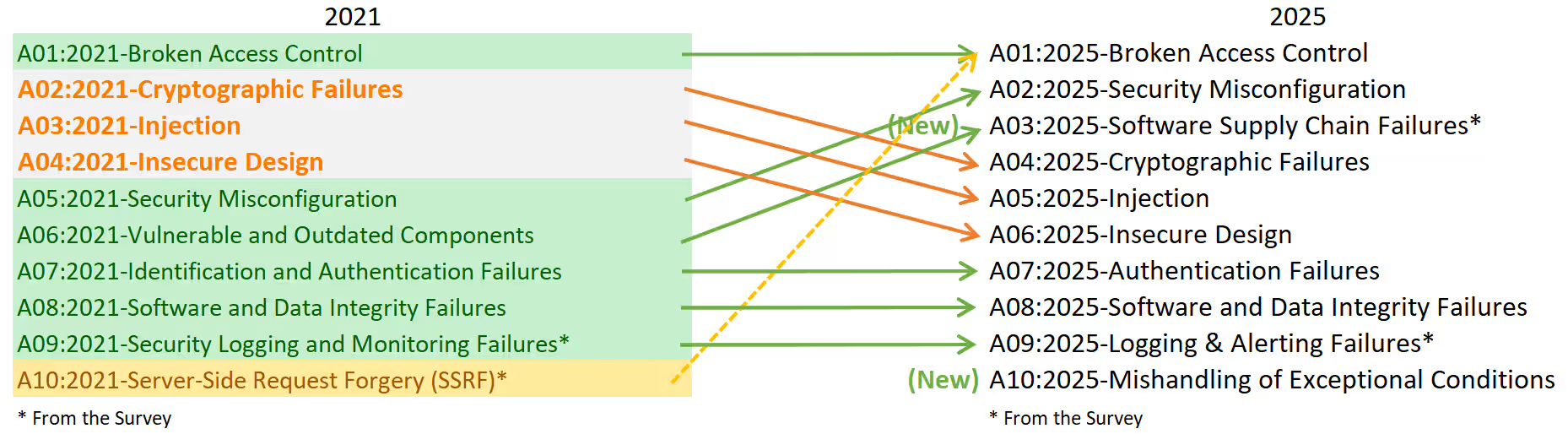
The OWASP Top 10 for 2025 are:
1. Broken Access Control
Access control enforces policy such that users cannot act outside their intended permissions. Failures typically lead to unauthorized information disclosure, modification, or destruction of data or performing a business function outside the user’s limits. Server-Side Request Forgery (SSRF) has been consolidated into this category for 2025.
A01:2025 Broken Access Control on owasp.orgExample lessons in this category:
Broken Access Control
- All resources on your site need to have access control implemented, even if they aren't intended to be discoverable by a user.
Directory Traversal
- Ensure file paths are safely interpreted, or hackers can access sensitive files on your server.
Cross-Site Request Forgery
- If an attacker can forge HTTP requests to your site, they may be able to trick your users into triggering unintended actions.
Server-Side Request Forgery
- An attacker can use SSRF vulnerabilities to probe your internal network.
Open Redirects
- Most web-applications make use of redirects. If your site forwards to URLs supplied in a query string, you could be enabling phishing attacks.
Privilege Escalation
- Privilege escalation occurs when an attacker exploits a vulnerability to impersonate another user or gain extra permissions.
2. Security Misconfiguration
Security misconfiguration occurs when a system, application, or cloud service is set up incorrectly, creating vulnerabilities. This includes unchanged default credentials, disabled security features, unnecessary components enabled, and overly verbose error messages that expose sensitive information.
A02:2025 Security Misconfiguration on owasp.orgExample lessons in this category:
Lax Security Settings
- Improper security settings are a common cause of vulnerabilities.
XML External Entities
- Unsafe treatment of external references in XML allows an attacker to probe your file system for sensitive information.
XML Bombs
- Unsafe treatment of XML entities can make your server vulnerable to attack from specially crafted XML files.
- New
Cross-Origin Resource Sharing
- Overly permissive CORS policies can allow malicious websites to access your APIs and steal user data.
Information Leakage
- Revealing system information helps an attacker learn about your tech stack.
3. Software Supply Chain Failures
Software supply chain failures are breakdowns or compromises in the process of building, distributing, or updating software. This goes beyond just using outdated components — it includes malicious changes in third-party code, compromised CI/CD pipelines, and dependencies obtained from untrusted sources.
A03:2025 Software Supply Chain Failures on owasp.orgExample lessons in this category:
Toxic Dependencies
- Third-party libraries could be introducing vulnerabilities or malicious code into your system.
- New
Slopsquatting (LLM Supply Chain)
- When LLM tools hallucinate package names, attackers can register malicious packages with those names.
4. Cryptographic Failures
Cryptographic failures stem from weak or improperly implemented cryptography, including broken algorithms, inadequate key management, and insufficient encryption of sensitive data. All data in transit should be encrypted at the transport layer, and data at rest must be protected through strong cryptographic practices.
A04:2025 Cryptographic Failures on owasp.orgExample lessons in this category:
Unencrypted Communication
- Insufficient encryption can make you vulnerable to monster-in-the-middle attacks.
SSL Stripping
- If only some actions on your website require HTTPS, an attacker may be able to steal credentials for your users.
Downgrade Attacks
- Attackers may be able to intercept, read and manipulate HTTPS traffic if you fail to specify a modern version of TLS.
5. Injection
Injection flaws occur when untrusted data is sent to an interpreter as part of a command or query. The attacker’s hostile data can trick the interpreter into executing unintended commands or accessing data without proper authorization. This includes SQL, NoSQL, OS command, and other injection types.
A05:2025 Injection on owasp.orgExample lessons in this category:
SQL Injection
- If you are vulnerable to SQL Injection, attackers can run arbitrary commands against your database.
Command Execution
- If your application calls out to the OS, you need to be sure command strings are securely constructed.
Regex Injection
- Regular expressions are frequently used in web-development, but can be abused by attackers.
Cross-Site Scripting
- If your site allows users to add content, you need to be sure that attackers cannot inject malicious JavaScript.
Reflected XSS
- When building a website, you need to be sure you do not accidentally create a channel that allows malicious JavaScript to be bounced off your server.
DOM-based XSS
- If you make use of URI fragments in your site, you need to ensure they cannot be abused to inject malicious JavaScript.
Remote Code Execution
- If an attacker can smuggle code into your web-server process, you have a serious problem.
- New
CSS Injection
- Attackers can manipulate user-generated CSS to extract sensitive data.
6. Insecure Design
Insecure design addresses vulnerabilities stemming from flawed architectural and design decisions rather than implementation errors. The design phase of your development lifecycle should gather security requirements and model threats, integrating security throughout the development lifecycle rather than adding it as an afterthought.
A06:2025 Insecure Design on owasp.orgExample lessons in this category:
Insecure Design
- Security begins before you start writing code.
File Upload Vulnerabilities
- File uploads are an easy way for an attacker to inject malicious code into your application.
Clickjacking
- As an application author, you need to be sure your users aren't having their clicks stolen by attackers.
7. Authentication Failures
Authentication failures allow attackers to assume the identity of legitimate users through weak or bypassed authentication mechanisms. This includes credential stuffing, brute force attacks, weak passwords, and improper session management.
A07:2025 Authentication Failures on owasp.orgExample lessons in this category:
Password Mismanagement
- Safe treatment of passwords is essential to a secure authentication system - yet many websites get this wrong.
User Enumeration
- Leaking username information on your site makes things much easier for hackers.
Session Fixation
- Insecure treatment of session IDs can leave your users vulnerable to having their session hijacked.
Weak Session IDs
- Guessable session IDs make your website vulnerable to session hijacking.
8. Software or Data Integrity Failures
Software and data integrity failures relate to code and infrastructure that don’t protect against integrity violations. This includes applications that rely upon plugins, libraries, or modules from untrusted sources, insecure deployment pipelines, and auto-update functionality that downloads updates without sufficient integrity verification.
A08:2025 Software or Data Integrity Failures on owasp.orgExample lessons in this category:
Prototype Pollution
- If an attacker can access and modify prototype objects in JavaScript, you are in danger.
Mass Assignment
- Automatically unpacking data from the HTTP request can sometimes be too easy.
9. Security Logging and Alerting Failures
Insufficient logging, monitoring, and alerting prevents timely detection and response to breaches and attacks. Without proper logging of security events and effective alerting mechanisms, attackers can further attack systems, maintain persistence, and tamper with or extract data undetected.
A09:2025 Security Logging and Alerting Failures on owasp.orgExample lessons in this category:
Logging and Monitoring
- Comprehensive logging and monitoring will tell you what your site is doing at runtime, which is key to spotting security events.
10. Mishandling of Exceptional Conditions
Mishandling exceptional conditions occurs when programs fail to prevent, detect, and respond to unusual situations, leading to crashes, unexpected behavior, and security vulnerabilities. This includes exposing sensitive data through error messages, “failing open” instead of securely, and improper cleanup when exceptions occur.
A10:2025 Mishandling of Exceptional Conditions on owasp.orgExample lessons in this category:
Information Leakage
- Revealing system information helps an attacker learn about your tech stack.